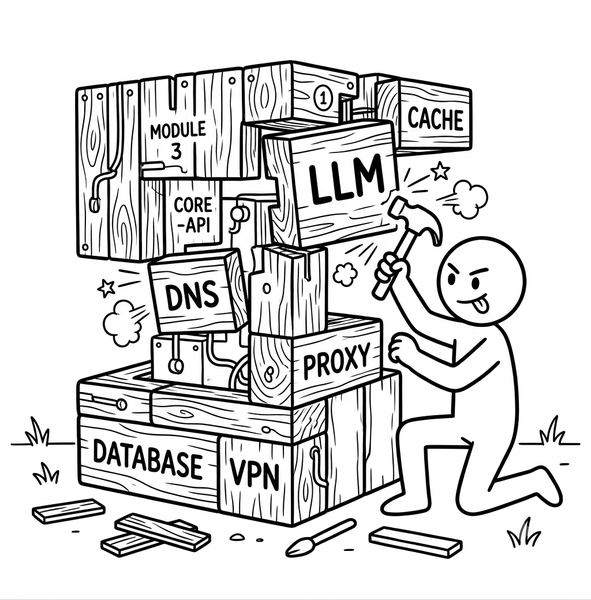
How I Built My Own Personal Cloud
Posted on August 4, 2026 • 22 minutes • 4581 words
Table of contents
- Six nodes, one brain, and zero Kubernetes
- Anatomy of the cluster: what each service does and why it matters
- When something can go wrong …
- The install order nobody tells you about until you’ve already messed it up
- 353 requests a second: the time my own bot attacked me
- Trust is an illusion you have to install about five times
- My graphics card shares a brain with my desktop (and other VRAM headaches)
- The switch Asus hid behind a European law
- When my Raspberry Pi was starving (for volts)
- The ultimate irony: I built an entire cluster and forgot to run
git init
- What’s still left to do (because this never really ends)
- Why it’s worth it, warts and all
- Project documentation
- Quick glossary
They say the cloud is the future. I’ve spent years telling other people exactly that, for a living.
As a solutions architect, I design cloud infrastructure, defend it in architecture review boards, and use it daily in several personal projects without any existential conflict about it. I’m not here to declare war on AWS, Azure, or anyone else. This isn’t that kind of article, no matter how much the headline might suggest otherwise.
What I did do, during my short summer vacation, inside an Ikea cabinet in my living room, was build a six-node cluster running local AI on top of it, with its own GPU, its own database, its own DNS, and even its own certificate authority.
And the question, for someone who gets paid to recommend the cloud to other people, is: what for?
The short answer is money: running language models on my own GPU saves me a decent chunk of what I’d otherwise spend on tools like Claude Code or GitHub Copilot. That’s a justification a spreadsheet would accept, and it might satisfy an accountant, but it’s not the real reason this project exists.
The real reason is that you learn in a completely different way when you install, break, and fix a system yourself than when you consume it already solved behind an API gateway. The cloud, and I say this from inside the profession, not as an outside complaint, is designed precisely so you never have to understand what’s underneath. That’s a brutal product advantage for anyone who just wants to solve a business problem. And it’s, at the same time, the biggest obstacle to real learning that exists in this industry today.
When you run your own inference server, you have to decide for yourself how much VRAM to reserve and why. When your own DNS goes down, you learn things about networking that no online course will ever teach you, because cloud providers have already simplified that layer down to a checkbox. I learn how to install, administer, and tune a real AI system, not just how to send it a prompt. I learn, at a low level, how the models I use every day actually work.
And I get to build serious benchmarks and comparisons on hardware I control from end to end, without the hidden variable of “what is someone else’s hypervisor doing underneath” contaminating every result.
And since the cluster already ships with the support pieces you need to run experiments properly (NAS, databases, observability, internal networking), every new lab I build on top of it doesn’t start from zero: it reuses that whole foundation and lets me actually focus on what I want to evaluate, instead of rebuilding the scaffolding every single time.
This isn’t purely for my own benefit either, even if that sounds like a nice excuse. Every time I set up one of these labs (exploring, pushing, and comparing technologies that in many cases I barely knew beforehand) I almost always end up writing one or more articles about what I found, with real data on the table, and an opinion I actually formed myself, not borrowed from someone else, about what each technology is really good for and what it isn’t.
This article is the first piece of that series: the story of why homelab-cluster exists, the decisions I made to build it without it turning into a chaos of loose cables and containers, and a lovingly curated selection of the incidents, most of them self-inflicted, that I had to work through along the way.
Six nodes, one brain, and zero Kubernetes
A little over a year ago, back when Raspberry Pi prices were still reasonable, it occurred to me that I could pick up a couple of these little machines and build myself a “lightweight” Kubernetes cluster with k3s, just to tinker with it and, while I was at it, put together something useful.
I did it, I booted it up, it worked, and I got my first dose of reality: for a cluster run by a single person in their spare time, dropping in an orchestrator built for entire platform teams is like buying a semi-truck to bring home the groceries; technically you can, but you’ll live to regret it.
Kubernetes didn’t just claim one of my cluster nodes all to itself to run the Control Plane; the rest of the nodes ran the k8s agent and sat under the master’s control, waiting around for things to happen, for load to spike so it could spin up pods, and so on and so forth. That’s great if you have hundreds of thousands of users, scale that’s a joy to have.
But on my cluster it’s just me, and occasionally one of my cats walking across the keyboard. Between the lack of users and losing direct touch with my own hardware, something that gives a control freak like me the shivers, the whole thing never quite clicked.
Instead, I decided each node would have its own independent docker-compose.yml, managed by hand (with a handful of my own scripts) over SSH. No magic orchestration layer trying to guess what I meant. If something breaks, I know exactly which machine to look at.
Here’s how it all shook out:
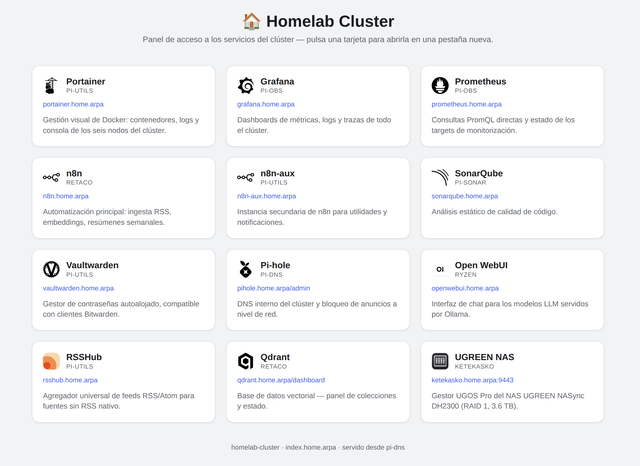
ryzen(internally nicknamedmole, because it’s my work PC, and it’s souped up): the only node with GPUs, so it carries all the heavy compute: Ollama, vLLM, Whisper, image generation.retaco: the data and automation node. Shared PostgreSQL, Qdrant as the vector database, and n8n orchestrating the workflows.pi-dns: the front door. Internal DNS, an HTTPS reverse proxy, and a custom API key system to protect anything without native authentication.pi-obs: the node that watches all the others. Metrics, logs, traces, dashboards.pi-sonar: static code analysis, because if I’m going to write microservices in Python for my own use, they might as well pass a decent quality check.pi-utils: the junk drawer: RSS, document conversion, scraping, a visual Docker manager, a password manager.
Four Raspberry Pi 5s, two PCs, and a NAS (“ketekasko”) that joined later for serious storage.
No third-party cloud involved, all of it tucked in a corner of my house, and all of it talking to each other over a network I control end to end (more or less).
Anatomy of the cluster: what each service does and why it matters
The nodes are already covered. What I haven’t shown yet is the service map, the one that actually explains how the cluster talks to itself, who trusts whom, and what breaks first if something fails:
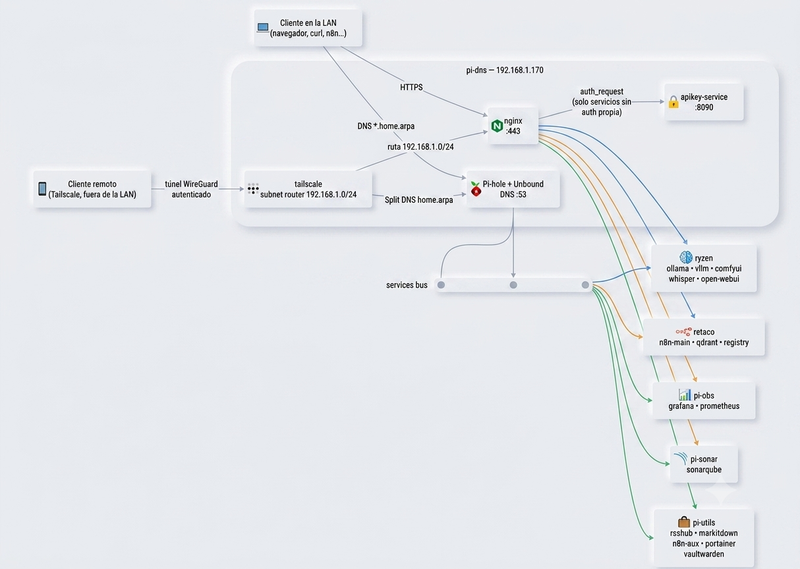
I’ll start with the front door, because everything else depends on it. nginx is the only point where HTTPS traffic enters the cluster for any *.home.arpa address (no shortcuts, not even for me).
Before letting a request through to a service that can’t authenticate on its own (Ollama, vLLM, ComfyUI, Whisper, markitdown, the scraper), nginx first asks apikey-service, a custom microservice that does exactly one thing: say yes or no to a key. Without a valid key, the request never even touches the real service. It’s the difference between “anyone on my LAN can talk to my GPU” and “only whoever I authorize can”, for a handful of tools that were never built with multi-user security in mind.
Right next door, on the same node, lives DNS: Pi-hole resolves every *.home.arpa name in the cluster (and blocks ads across the whole house as a bonus), and when the query isn’t internal it hands it off to Unbound, which does the actual recursive resolution against the internet. The two of them together are the reason I can type https://grafana.home.arpa instead of memorizing half a dozen IPs, and also, as I’ll get to later, the reason behind the one denial-of-service attack I ever pulled off against myself.
To get in from outside the house without opening a single port on the router, Tailscale acts as a subnet router: any device authenticated on my tailnet reaches 192.168.1.0/24 as if it were sitting in my living room, with split DNS so only home.arpa queries travel through the tunnel.
Once inside, traffic splits across a handful of pretty different service families.
The data layer: postgres-main, a single multi-tenant PostgreSQL where n8n, SonarQube, and apikey-service each have their own isolated database, and Qdrant, the vector database that indexes everything the content pipeline turns into embeddings, so it can do real RAG instead of just making up answers.
The inference layer: Ollama and vLLM serve language models (never at the same time, they take turns on the same GPU), while whisper-service transcribes audio and ComfyUI generates images.
The ingestion layer: RSSHub pulls in articles, markitdown-service converts them to clean Markdown, crawl4ai-scraper-service does the same for full web pages when RSS isn’t enough, and n8n is the glue that connects everything without me having to touch code every time I want to automate something new.
And then there’s the layer that doesn’t produce anything “customer-facing” but without which I’d be flying blind: Prometheus collects metrics from all six nodes, Grafana turns them into dashboards I actually look at, Loki and Tempo store logs and traces, and SonarQube audits the code quality of my own microservices before I have to audit it myself, yelling, in production.
Vaultwarden stores every password and token that all of the above services generate (it is, without exaggeration, the single most important service in the entire cluster, because if it’s ever lost, it takes access to everything else down with it). And Portainer lets me view and operate Docker across all six nodes from a single dashboard, without having to remember which one each container lives on.
None of these services is essential on its own. What makes them matter is the chain: no DNS means no names, no nginx means no entry point, no apikey-service means no control over who gets through, and without everything else, there isn’t much left to protect anyway.
When something can go wrong …
On paper, everything above sounds clean, almost elegant: six nodes, each with a clear job, a nice diagram I actually believed in while I was sketching it out on a scrap of paper, before touching a single real cable.
Reality had other plans, as it usually does.
I installed the cluster piece by piece, with the calm confidence of someone who’s spent years designing systems for other people to operate, and within hours I discovered (the hard way, and roughly in this order) that my own home-built robot was capable of attacking me, that “install the certificate once” is a phrase no engineer should ever say without crossing their fingers, that my graphics card had less memory than the box claimed, that the European Union had hidden a switch inside my own motherboard, that an ordinary phone charger nearly took down DNS for the entire cluster, and that, after years of telling other people to version their code, I’d forgotten to do it for my own.
None of this was the fault of the design on paper. All of it was the fault of real hardware, of me, or of some software component that decided, on its own, to reinvent a wheel that was already working perfectly fine without it.
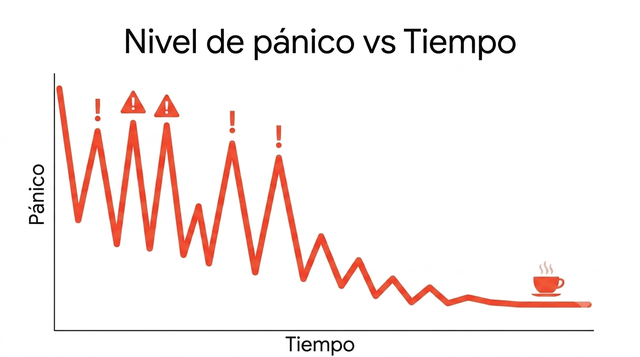
The install order nobody tells you about until you’ve already messed it up
When I designed the cluster on paper, I assumed that pi-dns, the node that acts as the front door for everything else, should be installed first.
Makes sense, right? It’s the front door. Except no.
Turns out pi-dns hosts a custom service, apikey-service, which issues and validates access keys for anything without native authentication. And that service needs to connect to a database that lives on retaco. And nginx, on pi-dns itself, won’t start until apikey-service is healthy.
So if you install pi-dns before retaco, your brand-new front door ends up ringing the bell of an empty house, retrying the connection in a loop until the rest of the cluster decides to show up.
It’s not a serious failure, it fixes itself the moment retaco boots up, but it’s exactly the kind of surprise you want caught in your documentation, not in the middle of a 3 a.m. reinstall. So I reordered the entire project documentation so that each guide’s number matched the real dependency order, instead of whatever order I happened to write them in.
A tiny fix that, every time I have to rebuild something from scratch, saves me the feeling of reading IKEA instructions translated by someone who’s never actually seen a piece of furniture.
353 requests a second: the time my own bot attacked me
This is my favorite incident, because it has that special flavor of screwups you brought entirely upon yourself.
I set up an n8n workflow named, with all the innocence in the world, “RSS Fetch & Store”. Its job was to gather articles from dozens of RSS feeds, convert them to Markdown, and store them already indexed.
One day I ran it, and minutes later retaco, the node where that workflow lives, stopped being able to resolve postgresql.home.arpa, which happens to be the exact internal name it uses to talk to its own database.
The diagnosis was as fun to piece together as it was uncomfortable to accept: the workflow was trying to resolve dozens of domains all at once (raw.githubusercontent.com, huggingface.co, openai.com, half the technical internet at once), practically in the same instant.
The result, according to Pi-hole’s own logs, was 353 DNS queries from a single node in a single second. Unbound, which handles the actual recursive resolution on a resource-limited Raspberry Pi, couldn’t keep up. Some query got delayed long enough for systemd-resolved to mark it as failed and decide, in its own special way, to stick with the fallback DNS forever (which, of course, knows nothing about my internal network).
I had built a bot whose only mission was to calmly read the news, and that bot, with no ill intent whatsoever, pulled off the closest thing to a denial-of-service attack against my own DNS. Against myself. In my own house.
The quick fix was bumping Unbound’s thread count from 4 to 8, so it could better absorb spikes of simultaneous queries. The real fix (limiting how many requests the workflow fires off at once) is still pending, sitting on my to-do list under the mental label of “things a well-mannered bot shouldn’t need explained to it twice”.
Trust is an illusion you have to install about five times
Since *.home.arpa isn’t a public domain, I set up my own internal certificate authority so every service could speak HTTPS without the browser greeting me every day with that panicked “this connection is not private” face. You install that authority’s certificate once on each device and you’re done, forever trusting any new service I add. Nice theory.
The practice is that every programming language and every container engine has independently decided it needs its own trust store, like a bunch of teenagers who refuse to share the TV remote.
The operating system has its own. Chrome has its own, separately, with its own NSS database. Firefox ignores both of the above and keeps a third one.
Node.js, and n8n along with it, completely ignores the operating system’s trust store for its own outgoing requests, so I had to point it to the CA by hand with a specific environment variable. Python, through the requests library, doesn’t look at the system store either: it uses the certifi package, so I had to explicitly point it at the certificate file or it would flatly refuse with a verification error. And just when I thought I was done: the BuildKit container I use to build multi-platform images lives in its own little universe, inheriting absolutely nothing from the host, so I had to copy the certificate into that container by hand and restart it so the push to the private registry would stop failing with an “unknown certificate authority” error.
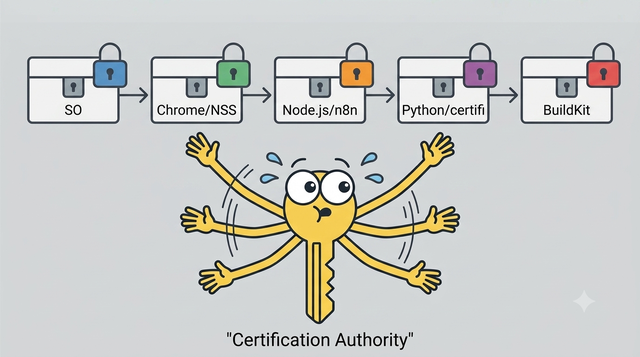
Five different layers of software. Five different places to install the same certificate. Nobody warns you that “install the CA once” is, in reality, a promise that breaks the first time you touch anything that isn’t a browser.
My graphics card shares a brain with my desktop (and other VRAM headaches)
The ryzen node has two GPUs: a 12 GB RTX 5070 and an 8 GB RTX 3070. Generous, on paper. In practice, the 5070 is also the one with the monitor plugged into it, because that machine doubles as my workstation, and simply having the desktop open permanently steals about 2.5 GB from the GPU. Twelve nominal gigabytes turn into, in practice, about nine real ones.
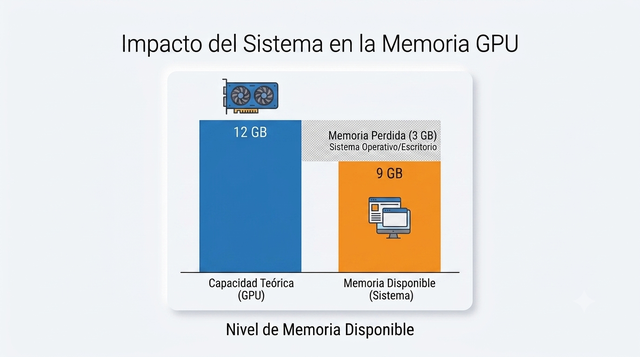
You don’t notice until you try loading a model in vLLM configured to use 90% of available memory, and the process blows up halfway through loading with a torch.OutOfMemoryError, because 90% of “twelve” and 90% of “nine” are very different numbers. I had to lower that percentage to something more conservative and, until I physically move the monitor cable to the other card, settle for a somewhat lighter default model instead of the one I actually wanted to use.
And as if that weren’t enough, on the other GPU, the 3070, I got a second scare: the audio transcription service had “use any available GPU” configured instead of pinning a specific one, so CUDA picked GPU 0 on its own (the same one already occupied by vLLM), and the two services ended up fighting over the wrong card. The fix was spelling out, by full name, exactly which GPU each service had to use, leaving zero room for anyone to improvise.
The switch Asus hid behind a European law
I wanted to be able to turn ryzen off at night to save power and turn it back on remotely whenever I needed it, so I set out to configure Wake-on-LAN. I enabled the corresponding setting in Linux without any trouble. I went into the BIOS to do the same on the firmware side and… the Wake-on-LAN option didn’t exist. It wasn’t disabled: it didn’t show up anywhere in the menu, as if the motherboard had never heard of the feature.
After a while of doubting my own sanity, I found the real cause: a setting called “ErP Ready”, buried in the power management configuration, which cuts standby power to the USB and PCI-E ports to comply with European low-power regulations for off mode. With that setting on, which is how it shipped out of the box, the Wake-on-LAN menu itself stayed hidden, not just disabled.
I turned off “ErP Ready”, and like magic, right next to it appeared the option I actually wanted to touch: “Power On By PCI-E/PCI”. I enabled it, saved, and ever since I can fully power down my desktop and turn it back on from any other node in the cluster with a simple magic packet over the network.
A European environmental regulation, designed to save energy in living rooms across the Union, nearly convinced me my motherboard was defective.
When my Raspberry Pi was starving (for volts)
pi-dns is, without a doubt, the most important node in the cluster: if it goes down, name resolution for everything else goes down with it. So when one day it started acting erratic, with reboots that made no sense at all, I handled the situation with all the seriousness it deserved: I ran around in circles with my hands in the air, screaming aaaaaaaah!
The system log had the answer, and it wasn’t subtle: 348 Undervoltage detected! warnings in under an hour. The Raspberry Pi 5 demands a genuinely stable 5-volt power supply, not an optimistic approximation, and the charger I had plugged in, perfectly valid for any other USB-C device in the house, fell short at exactly the moment the board needed more current.
The fix was as unglamorous as it was effective: an official 27W charger with Power Delivery, a quality cable with the right identification chip, and zero extension cords or hubs sitting between the outlet and the board. Dead silence in the logs ever since.
Sometimes the single most critical problem in your entire infrastructure isn’t a software one: it’s that the cable you used because it was “lying around” wasn’t as good as it looked.
The ultimate irony: I built an entire cluster and forgot to run git init
I’m saving this one for last because it’s pretty funny at my own expense. After days spent documenting every decision, every incident, every fix, with a docs/ folder pushing twenty dense pages, I did a full review of the project and discovered something embarrassing: all of that work was living as loose files on my own PC’s disk, with no version control whatsoever.
Not a single commit. Not one branch. No safety net if I ever deleted something by accident.
Me, someone who works in tech, who demands reasonable version control discipline from any project that isn’t mine, had my own home cluster left unprotected, like a 2003 Word document saved only to the desktop.
I added it to my own list of pending improvements at the highest priority that list has, next to a note that said: “this takes fifteen minutes to fix and the impact is massive”.
For once, I actually underestimated: git init, a well-thought-out .gitignore to make sure no secret slipped through, an initial commit, and a push to the remote: five minutes and a handful of commands, not fifteen.
The best-documented infrastructure in my entire house stopped being one rm -rf away from total disaster. I probably should rename this section, but I’ll leave it as a reminder that the cobbler’s children go barefoot.
What’s still left to do (because this never really ends)
No self-respecting homelab is ever “done”.
Right now I still need to automate the backups I’m still triggering by hand, set up a real notification channel so I don’t have to log into the dashboard to check if something’s failing, integrate the physical UPS I’ve had sitting there unconnected for months, and (with all the irony in the world, after that last story) keep polishing the migration to my own repository system instead of depending on someone else’s for this too.
None of that is urgent. None of it stops the cluster from working today, right now, while I write this in an editor connected to a database that lives a few feet away from me instead of in a data center on another continent.
There’s one advantage in all of this that never shows up on any to-do list, precisely because I’ve already earned it: here, testing something isn’t the same as testing it “on my machine”. A development laptop is clean, generous, and a bit of a liar: it has every tool already installed, a flat network with no firewall in the way, admin permissions by default, and no other service fighting over the same port or the same GPU.
It’s the perfect environment for something to work, and the worst possible environment to find out if it actually works.
The cluster looks a lot more like a real production environment, warts and all: there’s an internal DNS that can fail (and already has), there’s a firewall you need to understand before you can open a port, there are separate users and permissions per service instead of one all-powerful account, there are other services already running and competing for the same RAM and the same bandwidth, and there’s a real authentication layer in front of almost everything.
When something works in here, it works despite that friction, not thanks to its absence. And that is, without a doubt, the real guarantee that something works, without falling into the trap of “look how nice the demo looks”.
Why it’s worth it, warts and all
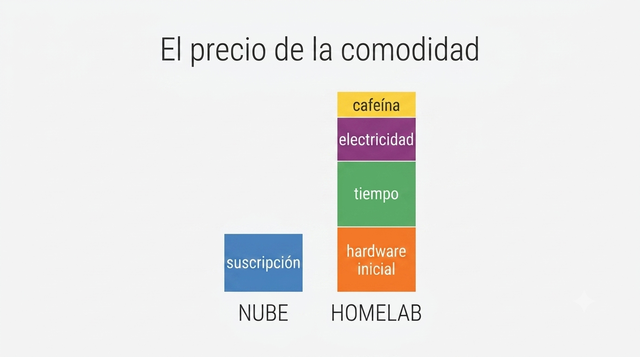
I could have saved myself 90% of these headaches with a credit card and three different providers. I know. I knew it from minute one.
And yet, every time one of these incidents got resolved, every time I truly understood why something had broken, not just how to silence the symptom, I learned something no SaaS product’s documentation would have ever taught me, because that documentation is designed precisely so you never need to understand what’s underneath.
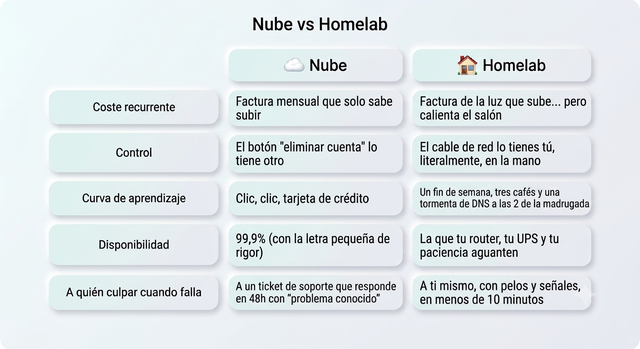
I have my own AI running on my own hardware, on my own data, with nobody else able to pull the plug on me. I have a Raspberry Pi that resolves internal domain names faster than my router takes to load its own admin panel. And above all, I have the certainty of knowing exactly where every single screw of my own infrastructure is.
And there’s one side benefit that never showed up on any spec sheet, and that I appreciate every November: six machines running more or less permanently, two of them with GPUs at full tilt whenever it’s time to train or serve models, generate a considerable amount of heat. In León, where winter takes its job very seriously, having a corner of the living room that never drops below a reasonable temperature has stopped being an annoying side effect and turned into, for all practical purposes, my backup heating system. My electricity bill goes up, sure, but my heating bill goes down enough to make up for part of it, and on top of that I get to say with a completely straight face that my servers work for me in more ways than one.
The cloud sells you convenience. I chose to understand things, and to keep my feet warm.
Project documentation
Everything covered here is documented in far more technical detail in the project’s GitHub repository : the full cluster topology, step-by-step installation for every node, the DNS incident with its full diagnosis, troubleshooting for common problems, the Tailscale setup for remote access, and the living list of future improvements.
Quick glossary
If the cluster has left you with more questions than a set of IKEA instructions, here are the key terms, no networking degree required.
- Homelab: a computing setup built at home, usually on modest hardware, to learn, experiment, or host your own services without depending on third parties.
- Self-hosted: any service you host yourself, on your own hardware, instead of paying for it as a managed cloud service.
- Reverse proxy: the “bouncer” that receives all incoming external traffic and decides which internal service to forward it to, without the visitor ever knowing anything about the real infrastructure behind it.
- Docker Compose: a tool for defining and launching several related containers (an app, its database, its dependencies) with a single configuration file.
- Wake-on-LAN: a mechanism that lets you turn on a powered-off computer by sending it a special network packet, with no need to physically touch it.
- VRAM: the graphics card’s own memory, where AI models get loaded so they can run; if it runs out, the model simply won’t load.
- RAG (Retrieval-Augmented Generation): a technique that combines a language model with your own knowledge database, so it answers with real, up-to-date information instead of making it up.
- Vector database: a database specialized in storing embeddings and finding the ones most similar to each other, the piece that makes RAG possible.
- Embeddings: a numerical representation of a text’s meaning, which lets you compare and search by content similarity instead of exact word matches.
- Tailnet: the private network Tailscale creates between all your authenticated devices, as if they were all on the same local network even though they’re scattered across the internet.