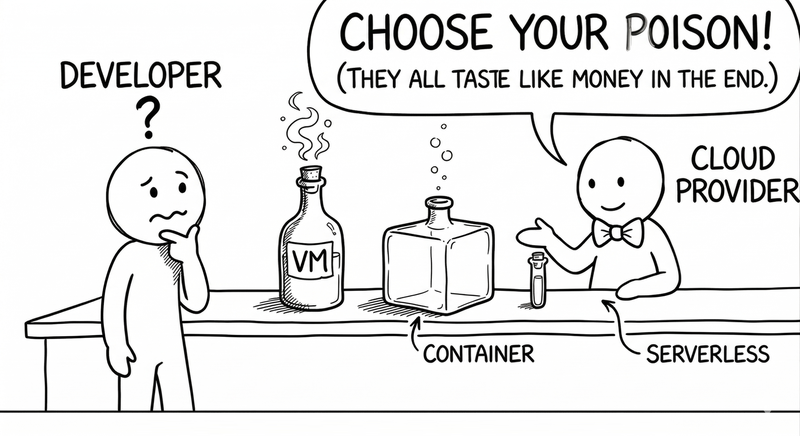
Serverless, Containers, and VMs: Pick Your Poison (and Your Bill)
Posted on April 20, 2026 • 11 minutes • 2273 words
Table of contents
Put me in an architecture meeting and I’ll bet you anything that within ten minutes someone says “what matters is business value”… and by minute fifteen you’re all arguing whether you’re Team VM, Team Container, or Team Serverless like you’re sorting yourselves into Hogwarts houses.
The funny thing is, all three options are just different ways of answering the same question: “Where the heck is my code going to run, and who’s stuck dealing with the mess?”
Everything else is just details… and invoices.
Let’s walk through these options as if they were three characters in an office novel: the VM, the grizzled veteran who’s seen it all; the container, the organized hipster; and serverless, which promises that “you don’t need to think about servers anymore” while giving you a wink.
The VM: the same old server, but in the cloud
The virtual machine is that coworker who’s been at the company for 15 years, knows every system inside out, and has never asked for a new chair.
On the outside, we call it a “VM” to feel modern; on the inside, it’s still a full-blown server : operating system, packages, processes, logs… all yours.
If you come from the on-premises world, the VM is the most straightforward translation: what you used to set up on bare metal, you now set up on a virtual machine in AWS, Azure, your favorite provider, or even your own datacenter. You pick the size (CPU, RAM, disk), you install the runtime, you configure the firewall, you reboot it when it acts up.
Why does it still make sense in 2026, when you could put “everything in containers” or “everything in serverless”?
Because there are situations where that explicit control-freak approach is a blessing — for instance, systems that need fine-grained OS control, unusual dependencies or specific drivers, or legacy applications that would cost more to rewrite than to let them live comfortably in a VM, and especially for long-running, stable workloads where you know a machine will be running 24/7; no magic needed, just keep it from falling over.
The dark side is predictable: with great power comes great responsibility.
Patching, monitoring, configuring, automating… it all falls on your team. The VM won’t scale itself because traffic spikes, nor will it decide on its own when to spin up another instance behind a load balancer; that’s on you, with your CI/CD, your Terraform, or your old-school scripts.
The comparisons between VMs, serverless, and containers boil it down to this: VMs give you more control and peace of mind at the cost of being the one who has to get up and check what went wrong.
It’s ideal if you want a simple world, or if you’re migrating to the cloud one step at a time without any appetite for rewriting half the company’s applications that were already working fine.
The container: the tidy friend who travels light
If the VM is the veteran who won’t budge from his desk, containers are the opposite: carrying your application in a neatly packed suitcase . Everything it needs to run goes inside, and it doesn’t matter which hotel you check into as long as there’s room for the suitcase.
The beauty of it is dead simple: you package your app and its dependencies into an image (Docker, for example), and that image runs the same way on your laptop, on a cloud VM, on an on-premises cluster , or on an edge node (fancy name for an old Raspberry Pi 4) hidden in a closet. The famous “it works on my machine” excuse loses a lot of its punch when the “machine” is the same everywhere.
Compared to VMs, containers are lighter: they share the host’s kernel, start fast, use resources more efficiently, and you can have a bunch of them coexisting on the same machine without spinning up a full OS for each one. That’s exactly why many guides recommend containers for large or complex applications you want to deploy in a consistent and portable way.
The fine print? A container doesn’t live alone: they tend to travel in packs.
When you go from “I have one container” to “I have a complex application with 15 services,” you suddenly need an orchestrator: Kubernetes, ECS, Nomad, or whatever flavor is trendy this month.
And that’s when the wheels start coming off: your problem is no longer just deploying code — it’s understanding deployments, services, internal networking , ingress controllers, autoscaling, health checks, and a long list of et ceteras.
That said, when you sit down and read comparisons carefully, the story always repeats: for applications of a certain size with a long lifespan, containers offer a really solid balance between control, portability, and efficient resource usage. Of course, the orchestration party has a price tag : more operational complexity, the need for specialization, and more tools to wrap your head around.
The container is that friend who organizes your entire house and labels everything, but who also talks you into buying a new cabinet for every single thing. Wonderful if you have a lot to organize; maybe overkill for a studio apartment.
Serverless: the cloud’s “don’t worry, I got this”
Time for the third character: serverless, who shows up to the party saying: “relax, you don’t need to think about servers anymore.”
Technically, of course there are servers — they’re just not yours. They belong to the cloud provider , who decides when to spin them up, when to shut them down, and how to charge you for every millisecond of usage.
The pitch is very seductive: you upload functions or small services, define triggers (HTTP, queues, cron, events), and the platform handles all the dirty work: scaling when there are spikes, dropping to zero when there’s no traffic, distributing instances across zones, retrying when something fails, and sending you the bill at the end of the month .
For many types of workloads — small API backends, batch tasks, event processing, system integrations — this is pure gold, and those who’ve tried it back it up: higher developer productivity (less time on infra, more on logic), very fine-grained autoscaling, and an attractive cost model: you pay per invocation and resources used, not for machines sitting idle.
But real life, as always, adds nuance. Recent articles have put serverless “under fire” for three main reasons: complexity, costs, and lock-in.
Complexity comes from the fact that a medium-sized system can end up with dozens or hundreds of scattered functions, each with its own permissions, triggers, and logs. Debugging that without good practices and good tooling can turn a quiet afternoon into a cloud-based episode of CSI.
With costs, there’s a paradox similar to what we’ve seen with microservices: for small or moderate volumes, the pay-per-use model is usually very competitive; but past certain massive thresholds, there are documented cases where it’s way cheaper to run something boring on your own infrastructure.
Figma, for example, became famous for rethinking part of its architecture because its serverless bill had ballooned to jaw-dropping figures, and comparative analyses show how at scale the Lambda+queues model could cost several times more than well-tuned dedicated clusters.
And then there’s the old friend: lock-in. Serverless is, by definition, a big party at the provider’s house: the way you declare functions, integrations, queues, permissions, and timeouts isn’t easily portable somewhere else. There are recent analyses that focus squarely on this “lock-in dilemma and spiraling complexity” : if you try to avoid lock-in entirely, you lose many of the advantages; if you ignore it, you might find that moving platforms becomes a million-dollar project.
Serverless is the friend who picks up every tab… but ends up owning your house, your car, and your firstborn.
It’s not a fight, it’s a love triangle (and an invoice)
I know that by now you’re expecting a definitive verdict, but serious comparisons are a lot less thrilling than most threads on X: there’s no absolute winner, just contexts.
VMs shine when you need stability, compatibility, and control: migrating legacy systems, running very OS-specific things, keeping applications alive that aren’t worth rewriting. They’re still the foundation on which, ultimately, almost everything else runs ; even your containers and your functions live on VMs you never see.
Containers are the go-to tool when you want to package entire applications in a portable and consistent way, with decent control over resources and networking, and you’re willing to invest in orchestration tooling. They work especially well for long-running services, medium-to-large APIs, and internal systems you want to move across environments without (too much) suffering.
Serverless fits like a glove in scenarios where the workload is irregular , components are small, startup latency isn’t critical, and you want to minimize anything that smells like “managing servers.” Great for glue code between systems, internal automations, lightweight APIs, async jobs. A lot less great for services that need low and consistent latency, complex in-memory state, or extreme configuration control.
So what do sensible people do? They mix and match , rather than picking one model and cramming it everywhere: VMs for what you don’t want to touch yet, containers for your long-lived core, serverless at the edges to react to events and automate the details.
Pick your poison… but read the label
At the end of the day, choosing between VMs, containers, and serverless is dangerously similar to choosing a mortgage: they all have fine print, they all involve trade-offs, and none of them is “the right one” without context.
VMs tie you less to complex patterns, but hand you less automation. Containers give you portability and consistency, but ask you to learn how to tame an orchestrator. Serverless saves you from thinking about servers, but forces you to think about limits, bills, and dependencies on a specific provider .
The good comparison articles — the ones that aren’t just vendor marketing — all land on the same uncomfortable idea: don’t pick based on hype, pick based on use case. And if possible, do it knowing that what you decide today isn’t forever: tomorrow you might move a chunk from serverless to containers, or consolidate containers onto VMs, if your traffic, your team, or your bill changes.
If there’s one takeaway, it’s this: when someone on your team says “we need to go serverless” or “everything has to be in containers,” try swapping that sentence for a different one:
“For this specific problem, with this team and this projected usage… which deployment model will hurt the least today and two years from now?”
The answer won’t look as cool on a t-shirt as a Lambda or Kubernetes logo, but it’s a much better bet for letting you sleep at night… and paying the bill without any nasty surprises.
Quick glossary
If you made it this far without Googling any of these terms, congratulations: you’re either a senior engineer or a liar.
- CI/CD — Continuous Integration / Continuous Delivery. Automating the cycle of building, testing, and deploying code without manual intervention.
- ECS — Elastic Container Service, AWS’s own container orchestrator.
- Edge — A compute node close to the end user, outside the main datacenter, to reduce latency.
- Glue code — Code that connects systems together without any business logic of its own.
- Health check — An automatic, periodic check that a service is alive and responding correctly.
- Ingress controller — A component that manages inbound traffic (HTTP/HTTPS) to services inside a container cluster.
- Kernel — The core of the operating system; manages hardware, memory, and processes. Containers share the host’s kernel.
- Kubernetes — An open-source container orchestrator, created by Google and now the de facto industry standard.
- Lambda — AWS’s serverless service and, by extension, casual shorthand for “function in the cloud.”
- Lock-in — Technical dependency on a provider that makes migration painful (and expensive).
- Nomad — HashiCorp’s workload orchestrator, a lighter alternative to Kubernetes.
- On-premises — Infrastructure that physically lives in your own facilities, not in a third-party cloud.
- Runtime — The execution environment your application needs to run (Java, Node, Python…).
- Terraform — HashiCorp’s Infrastructure as Code tool for defining and provisioning infrastructure declaratively.
Sources and references
What I read so I wouldn’t be making stuff up, listed so you can pretend you read it too.
- VMs vs Containers vs Serverless: Everything You Need to Know - DotCMS. Full comparison of the three deployment models.
- Serverless vs Containers - Datadog. Key differences between serverless and containers with decision criteria.
- VMs vs Serverless Containers - Tilaa. Comparison focused on VMs vs. containers and serverless.
- Serverless vs Containers - TierPoint. When to choose each model based on workload type and team.
- Serverless vs Containers - RishabhSoft. Developer productivity and portability in both models.
- Serverless vs Containers - CloudZero. Costs, orchestration, and operational trade-offs.
- The True Cost of Microservices - SoftwareSeni. Operational complexity and the real cost of orchestration.
- Do You Really Need Microservices Architecture - Authorea. Analysis of when microservices complexity isn’t worth it.
- Serverless vs Containers: When to Choose and Why It Matters - Beetroot. Selection criteria and their impact on product delivery.
- Serverless vs Containers - Cloudflare. Clear explanation of both models with technical comparison.
- The Conundrum of Serverless Lock-in & Spiralling Complexity - Serverless Advocate. The lock-in dilemma and growing complexity in serverless.
- Serverless Under Fire: Complexity, Costs & Cloud Confusion - Bran Kop (LinkedIn). Serverless under fire: complexity, costs, and confusion.
- Serverless vs Self-Hosted: Real Cost Analysis - Sanj.dev. Real cost analysis comparing serverless with self-hosted infrastructure.
- Serverless Architectures: Comparison, Pros, Cons and Case Studies - AgileEngine. Case studies and comparison of serverless architectures.
- Mitigating Serverless Lock-in Fears - ThoughtWorks. Strategies for reducing lock-in risk in serverless.