uv without fear: designing your Python platform layer
Posted on May 19, 2026 • 22 minutes • 4614 words
Table of contents
- The problem isn’t speed
- The toolchain is a platform layer
- The real advantages (the ones that actually matter)
- Before the examples: install uv
- Example 1 — A new project in four commands
- Example 2 — Migrating a legacy project in phases (no big bang)
- Example 3 — Code quality governance with Ruff and pre-commit
- Example 4 — Reproducible CI in 40 lines
- Example 5 — A real multi-stage Dockerfile
- Example 6 — PEP 723: the Slack gist as a reproducible artifact
- Okay, but what if Astral disappears tomorrow?
- The Monday checklist
- Wrapping up
- Quick glossary
- Sources and references
We’ve been arguing about the same things in Python for twenty years. Whether to use virtualenv or venv. Whether pip or pip-tools is the right call. Whether Poetry is deprecated or just in a bad mood. Whether pyenv is for serious engineers or just people with too much time on their hands.
Open any repo from three projects ago and you’ll find a Frankenstein held together with duct tape: a Makefile that activates a venv, a hand-maintained requirements.txt, a requirements-dev.txt that nobody’s touched since 2022, and a Dockerfile that does pip install with versions eyeballed into place.
And somehow it works. More or less. On your machine. On Tuesdays. After the second coffee.
That’s not a toolchain . That’s hope-driven engineering.
This article is about getting out of that swamp.
Specifically, it’s about uv , Astral’s package manager that’s been eating the ecosystem for the past year while most people still see it as “pip but fast.”
It’s not. It’s something far more interesting: it’s a proposal for a platform layer for your Python projects.
Fair warning: you won’t find benchmarks here, no holy war against Poetry, no flat list of commands without context.
What you’ll find is why a unified toolchain changes how you reason about your projects, what concrete advantages uv gives you, and six practical examples with working code.
If by the end you can’t migrate a small project to uv, I’ve probably failed you.
The problem isn’t speed
When someone first shows you uv, the usual pitch is “it installs numpy in 0.3 seconds.”
And sure, that’s nice. But that’s not the serious reason to switch. Speed is a side effect, not the point.
The real problem is in the list below. Raise your hand if any single one of your repos currently has all of these:
piporpip-toolsfor resolution,virtualenvorvenvfor isolation,pyenv(orasdf, or nothing at all) for Python versioning,poetry,pdm,pipenv, orhatchfor “everything else,”- a
Makefileortox.inito hold it all together with duct tape, - a
Dockerfilethat duplicates half the work above because “we don’t trust it in prod.”
If both hands are up, congratulations: you’re running a zoo. Every animal with its own temperament, its own cage, its own diet, its own vet. And the vet is you. Every Friday at 5 PM.
This isn’t anyone’s fault. It’s the natural result of an ecosystem that’s been adding layers for twenty years without removing any. Every tool was born to solve a real problem.
The issue isn’t the tools: it’s that the combination of all of them isn’t a tool. It’s an unspoken agreement between people who no longer work with you.
We call that combination, almost by accident, “the project platform.”
And since nobody designs it, it designs itself by accident.
The toolchain is a platform layer
Hold onto this idea, because it’s the only thing that really matters in this article:
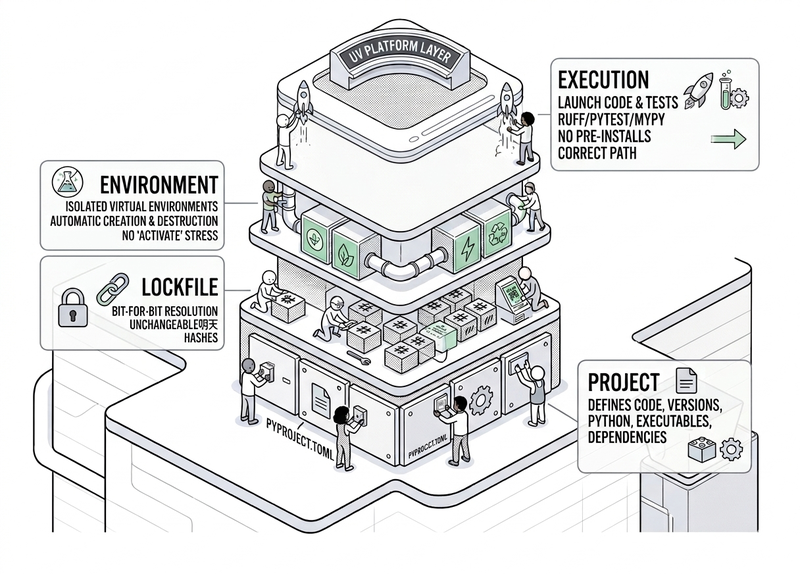
Your Python toolchain isn’t an infrastructure detail. It’s a platform layer. And it has four responsibilities: project, lockfile, environment, and execution.
The Project defines what your code is: its name, its version, what it exposes as an executable, what dependencies it declares, and which Python version it runs on. All of that lives in pyproject.toml, standardized by PEP 517, 518, and 621. That’s not up for debate anymore.
The Lockfile captures exactly which versions were resolved, with their hashes, so that tomorrow someone else gets bit-for-bit the same result. It’s what package-lock.json, Cargo.lock, and Gemfile.lock have been doing in other ecosystems for over a decade. Python has been waiting for something like this for a while.
The Environment creates, maintains, and destroys virtual environments without you having to think about it. No more wrestling with source venv/bin/activate every time you open a new terminal.
Execution runs your code, your tests, your tools (pytest, ruff, mypy) or a standalone script, without requiring you to pre-install anything globally or pray that PATH is set correctly.
Now the question: how many tools do you need today to cover all four of those responsibilities?
In most legacy repos: four or five.
Each with its own config file, its own idea of what “the current venv” is, and its own specific version you have to pin in CI by hand.
In a uv project: one. A single binary. A single mental model.
That’s not an incremental productivity improvement. It’s an architecture change. And like any architecture change, what it gives you isn’t going faster at the same things — it’s stopping doing things that add no value.
The real advantages (the ones that actually matter)
Before we get into code, let me walk through the advantages you’ll actually notice after two weeks.
Not the ones from day one. The ones that show up when you’ve been using it for a while and suddenly realize you’re no longer thinking about things that used to take up a third of your mental bandwidth.
1. One source of truth per project
pyproject.toml is what you want.
uv.lock is what you got.
That’s it.
No requirements.txt that someone generated eight months ago with different versions. No setup.py with install_requires out of sync with requirements.txt. No Pipfile sleeping in the repo “just in case.”
When there are only two files and both are mandatory and both are versioned, the question “where does this version come from?” has an answer. And it’s a short one.
2. Real reproducibility, with hashes
uv.lock doesn’t stop at “django 5.0.4”. It stores the SHA256 hash of the wheel that was downloaded.
If tomorrow someone replaces a package on PyPI (or if a corporate mirror caches it wrong), your build fails before installing anything suspicious.
This isn’t paranoia — it’s the baseline for any serious supply chain security practice, and it’s been standard in npm, Cargo, and RubyGems for years.
3. Same model in local, CI, and production
This deserves its own section, but here’s the preview: the developer, the GitHub Actions runner, and the production container all use the same lockfile.
The only difference between them is the flags (--no-dev, --frozen, --no-editable).
Three filtered views of the same model. Not three parallel universes.
4. Python version management without pyenv
uv downloads the Python version you ask for (requires-python in pyproject.toml) if you don’t have it.
No compiling. No touching your shell. No weird aliases.
If your project asks for 3.12.3, that’s what runs. Full stop.
5. Ephemeral tools with uvx
Before, installing httpie or cookiecutter meant making a decision: do I install it globally? Create a venv just for this? Use pipx?
With uv: uvx httpie GET https://example.com.
Downloaded, cached, executed. Next time it’s instant.
No footprint left on your system.
6. Single-file scripts as reproducible artifacts
This might look like a minor trick, but it’s one of the most elegant ideas in the recent ecosystem.
We’re talking about PEP 723 : inline metadata in a script.
A .py file with a block at the top that declares its dependencies and Python version. uv run script.py just runs it.
No README. No requirements. No crossing your fingers.
There’s an example later.
7. Simple enough that you don’t need to write it down
This is the most underrated feature. When your toolchain is a single tool with a single CLI, new team members are up to speed in an afternoon.
You don’t have to write three pages of CONTRIBUTING.md explaining “first you activate pyenv, then you enter the venv, then you run poetry install but careful if you’ve changed pyproject because then…”
You write, literally: uv sync. That’s it.
What you gain there isn’t speed. It’s mental headroom. And you’ll notice it by the third person who joins your project.
Before the examples: install uv
If you don’t have it yet:
# macOS / Linux
curl -LsSf https://astral.sh/uv/install.sh | sh

# Windows (PowerShell)
powershell -ExecutionPolicy ByPass -c "irm https://astral.sh/uv/install.ps1 | iex"

# or if you live inside Homebrew
brew install uv

# or if you live inside Scoop
scoop install uv
Verify it’s alive:
uv --version
The examples below assume you’re in a decent bash/zsh shell.
If you’re on PowerShell or cmd, the uv ... commands are identical; the only difference is some path concatenation. Downside of using Windows.
Example 1 — A new project in four commands
Code at
ejemplo-01-proyecto-nuevo/.
This is the “starting something new today” scenario.
A CLI that generates cryptographically secure passwords from the command line. Because password123 isn’t a security strategy — it’s a statement of intent.
uv init --package genpass
cd genpass
uv add rich
uv add --dev pytest ruff
The structure it generates looks like this:
genpass/
+-- .python-version          # pinned Python version for the repo
+-- pyproject.toml           # project contract
+-- README.md
+-- src/
|   \-- genpass/
|       +-- __init__.py
|       \-- py.typed
+-- tests/
\-- uv.lock                  # what actually got resolved
Look at that pyproject.toml. You didn’t write it and it’s already correct:
[project]
name = "genpass"
version = "0.1.0"
description = "Cryptographically secure command-line password generator."
readme = "README.md"
requires-python = ">=3.12"
dependencies = [
    "rich>=13.7",
]

[project.scripts]
genpass = "genpass.cli:main"

[dependency-groups]
dev = [
    "pytest>=8.0",
    "ruff>=0.5",
]

[build-system]
requires = ["hatchling"]
build-backend = "hatchling.build"
There are three things you didn’t have to decide that uv handled for you:
src/layout: isolates your code from the environment; you can’t accidentallyimportfrom the root. It’s the grown-up way to package Python and has been for over a decade.devdependency groups: standardized by PEP 735 . Won’t be installed in production. Will be in CI.- hatchling build backend: simple, maintained, no surprises. If you want a different one tomorrow, it’s two lines.
Running things:
uv run pytest                 # runs the project tests
uv run genpass                # runs the CLI declared in [project.scripts]
uvx ruff check .              # runs ruff without installing it in the project
Notice you never ran source venv/bin/activate? That’s because uv handles it for you, on every uv run, without touching your shell.
If you’re used to the activate tradition, you’ll miss it for about 48 hours. Then it passes.
Example 2 — Migrating a legacy project in phases (no big bang)
Code at
ejemplo-02-migracion-legacy/.
Here’s the million-dollar question: “okay, sounds great for greenfield, but I’ve got a repo from 2019 with a setup.py and a Makefile that remembers more than I do.”
Fair enough. Let’s migrate it. In phases. Without touching production code.
We start with something like this (written by our buddy Pakito, who no longer works here):
# setup.py
from setuptools import setup, find_packages

setup(
    name="ventas-cli",
    version="0.3.1",                    # written by hand. the release is a lie.
    description="Processes sales CSVs and generates a summary.",
    author="Pakito",
    author_email="Pakito@old-company.com",   # Pakito doesn't work here anymore.
    packages=find_packages(exclude=["tests"]),
    install_requires=[
        "click",                        # unpinned. pure luck.
        "requests>=2.28",               # wide range. almost worse than nothing.
        "pandas==1.5.3",                # exact. works. do not touch. do not breathe.
        "python-dateutil",
    ],
    entry_points={
        "console_scripts": [
            "ventas-cli = ventas.cli:main",
        ],
    },
    python_requires=">=3.8",            # production runs on 3.11.
)
And a requirements.txt with things like requests==2.28.0 that don’t match the setup.py, of course.
The clean migration has five phases, each one a separate PR. None of them touch your production code.
Phase 1 — Inventory and Python version lock
Before touching anything, understand what you have.
Generate a frozen inventory of your current environment and pin the actual Python version your production runs on:
# From the venv actually running in production today:
pip freeze > inventario.txt
python --version              # e.g.: Python 3.11.8
echo "3.11.8" > .python-version
This breaks nothing. It’s just documenting what was already there.
Phase 2 — pyproject.toml + uv.lock, without touching setup.py
Create a minimal pyproject.toml from the inventory.
Heads up: here’s the gotcha that trips up most people migrating. If the package name (ventas-cli) doesn’t match the directory (src/ventas/), you need to tell hatchling explicitly:
[project]
name = "ventas-cli"
version = "0.4.0"                       # first post-migration release.
description = "Processes sales CSVs and generates a summary."
readme = "README.md"
requires-python = ">=3.11"              # aligned with production. makes sense now.
dependencies = [
    "click>=8.1",
    "requests>=2.32",
    "pandas==1.5.3",                    # still pinned. when it's time to update, we'll update.
    "python-dateutil>=2.9",
]

[project.scripts]
ventas-cli = "ventas.cli:main"

[dependency-groups]
dev = [
    "pytest>=8.0",
    "ruff>=0.5",
]

[build-system]
requires = ["hatchling"]
build-backend = "hatchling.build"

[tool.hatch.build.targets.wheel]
packages = ["src/ventas"]               # <- this is what half the internet forgets
Now:
uv lock
uv sync
git add pyproject.toml uv.lock .python-version
git commit -m "chore: introduce uv toolchain (no logic changes)"
From this point on, the lockfile is the truth. setup.py still exists for now, but it’s no longer in charge.
Phase 3 — Migrate CI
One PR. Update the job to use uv:
# .github/workflows/ci.yml
- uses: astral-sh/setup-uv@v6
  with:
    enable-cache: true
    cache-dependency-glob: "uv.lock"
- run: uv sync --frozen
- run: uv run pytest
- run: uv lock --check         # fails the PR if pyproject changed without a re-lock
That last line is one of the most useful things you’ll ever put in a CI file.
Phase 4 — Migrate the Dockerfile
Covered in Example 5. Multi-stage, builder with uv, runtime without uv.
Phase 5 — Delete setup.py and requirements*.txt
Last PR. Once your CI has been green with uv for a week and production is too, delete the fossils:
git rm setup.py requirements.txt requirements-dev.txt
git commit -m "chore: remove legacy packaging files"
If the legacy Makefile had useful targets (make test, make lint), you can keep them as shims pointing to uv:
test:
	uv run pytest

lint:
	uvx ruff check .

sync:
	uv sync --frozen
That way, anyone who has make test burned into muscle memory doesn’t have to relearn anything on Monday.
The migration doesn’t touch your product — it changes who governs your environment.
Example 3 — Code quality governance with Ruff and pre-commit
Code at
ejemplo-03-ruff-precommit/.
Now that your platform lives in pyproject.toml, it makes sense for your quality policy to live there too. And to be executable, not a PDF on Confluence that nobody reads.
Ruff
is a linter and formatter that replaces flake8, isort, black, pyupgrade, and half a dozen others.
It’s written in Rust and you configure it in four lines:
# pyproject.toml
[tool.ruff]
line-length = 100
target-version = "py312"

[tool.ruff.lint]
select = ["E", "F", "I", "UP", "B", "SIM"]
ignore = ["E501"]   # the formatter already measures line length, no need to warn twice

[tool.ruff.format]
quote-style = "double"
Here’s a genuinely messy file:
# ejemplo_feo.py
import os, sys      # multiple imports on one line: bold choice
import json
import json         # imported twice

def sumar(a,b):
    if lista == []:        # should be `if not lista:`
        pass
    x = a+b
    return(x)              # `return` isn't a function
Run ruff without installing it in the project (thanks to uvx):
uvx ruff check ejemplo_feo.py
Output:
F401  'os' imported but unused
F811  redefinition of unused 'json'
E401  multiple imports on one line
SIM201  use `if not lista:`
F821  undefined name 'lista'

Found 5 errors.
[*] 4 fixable with the --fix option.
Four out of five fixed automatically:
uvx ruff check --fix ejemplo_feo.py
uvx ruff format ejemplo_feo.py
And to make sure a messy file never sneaks into main? Pre-commit:
# .pre-commit-config.yaml
repos:
  - repo: https://github.com/astral-sh/ruff-pre-commit
    rev: v0.5.6
    hooks:
      - id: ruff
        args: [--fix]
      - id: ruff-format
Result: you stop arguing about formatting in PRs. Forever.
Policies that are versionable (they live in the repo), executable (anyone runs them with one command), and automatic (they fire on commit).
That’s real governance: the kind that lives in the code, not the kind that lives in Confluence.
Example 4 — Reproducible CI in 40 lines
Code at
ejemplo-04-ci/.
Once your local platform is solid, CI practically writes itself.
A complete uv CI for a project looks like this:
# .github/workflows/ci.yml
name: CI

on:
  push:
    branches: [main]
  pull_request:

jobs:
  test:
    runs-on: ubuntu-latest
    strategy:
      matrix:
        python-version: ["3.11", "3.12", "3.13"]
    steps:
      - uses: actions/checkout@v4

      - name: Install uv
        uses: astral-sh/setup-uv@v6
        with:
          enable-cache: true
          cache-dependency-glob: "uv.lock"

      - run: uv python install ${{ matrix.python-version }}
      - run: uv sync --frozen --all-extras
      - run: uv run ruff check .
      - run: uv run ruff format --check .
      - run: uv run pytest -q --cov=src
      - run: uv lock --check
The three lines that really matter are:
astral-sh/setup-uv@v6: installs uv and caches the resolver between runs. You’ll never see “resolving dependencies…. 4 minutes” again.uv sync --frozen: installs exactly what the lockfile says. If the lockfile is out of sync withpyproject.toml, it fails here. And it should fail here.uv lock --check: the safety net. If someone edited dependencies without re-locking, the PR doesn’t merge. End of conversation.
If you publish to PyPI, add a release workflow with trusted publishing (OIDC, no tokens):
# .github/workflows/publish.yml
name: Publish to PyPI

on:
  release:
    types: [published]

jobs:
  publish:
    runs-on: ubuntu-latest
    permissions:
      id-token: write     # required for OIDC
    steps:
      - uses: actions/checkout@v4
      - uses: astral-sh/setup-uv@v6
      - run: uv build
      - run: uv publish    # authentication via OIDC, no secrets in the repo
Zero secrets. Zero PYPI_API_TOKEN to rotate every year. GitHub Actions provides the identity via OIDC and PyPI trusts it.
Three years ago this felt like science fiction. Today it’s seven lines.
Example 5 — A real multi-stage Dockerfile
Code at
ejemplo-05-dockerfile/.
The classic Python Dockerfile trap is shoving pip inside and crossing your fingers.
The grown-up version is multi-stage: a builder with uv that resolves the environment, and a runtime that only has Python and your .venv.
No pip. No compilers. Not even uv.
# syntax=docker/dockerfile:1.9

# --- STAGE 1 -- builder -------------------------------------------------------
FROM python:3.12-slim-bookworm AS builder

# uv isn't installed — it's copied from its official image. Idempotent build.
COPY --from=ghcr.io/astral-sh/uv:0.5.8 /uv /uvx /bin/

ENV UV_LINK_MODE=copy \
    UV_COMPILE_BYTECODE=1 \
    UV_PYTHON_DOWNLOADS=never

WORKDIR /app

# Layer 1: only metadata + lockfile. Cacheable until dependencies change.
RUN --mount=type=cache,target=/root/.cache/uv \
    --mount=type=bind,source=uv.lock,target=uv.lock \
    --mount=type=bind,source=pyproject.toml,target=pyproject.toml \
    uv sync --frozen --no-dev --no-install-project

# Layer 2: the code. Changing it does NOT invalidate the previous layer.
COPY . /app
RUN --mount=type=cache,target=/root/.cache/uv \
    uv sync --frozen --no-dev --no-editable

# --- STAGE 2 -- runtime -------------------------------------------------------
FROM python:3.12-slim-bookworm AS runtime

RUN groupadd -r app && useradd -r -d /app -g app app

# Only the resolved .venv + your code. Nothing else.
COPY --from=builder --chown=app:app /app /app

ENV PATH="/app/.venv/bin:$PATH"

USER app
WORKDIR /app

CMD ["python", "-m", "app.main"]
Three decisions here worth calling out:
- uv is copied, not installed. The
ghcr.io/astral-sh/uv:0.5.8image is official and pinned. When uv 0.5.9 comes out, your build is still bit-for-bit what it was today. No surprises. - Bind mounts instead of
COPYforuv.lockandpyproject.toml. That way they don’t end up in the layer and cacheability is maximized. - The runtime contains no uv. No pip. No compilers. Just Python and your pre-resolved
.venv. The final image weighs around 120 MB instead of the 800–1200 MB typical of a sloppy Dockerfile.
And a free security win: you run as a non-root app user with no login shell.
Free wins are worth taking.
If your image weighs 2 GB, someone is paying for that. Probably your infra team. Probably on every deploy. Probably without knowing it.
Example 6 — PEP 723: the Slack gist as a reproducible artifact
Code at
ejemplo-06-pep723/.
This is the showstopper.
Turns out the “Pakito sent me a script over Slack in 2022” problem has a solution.
Create a file called hola_pep723.py:
#!/usr/bin/env -S uv run --script
# /// script
# requires-python = ">=3.12"
# dependencies = [
#     "requests>=2.32",
#     "rich>=13.7",
# ]
# ///
"""Checks the latest uv version on PyPI and prints it with colors."""

from __future__ import annotations

import requests
from rich.console import Console


def main() -> None:
    console = Console()
    r = requests.get("https://pypi.org/pypi/uv/json", timeout=10)
    info = r.json()["info"]
    console.print(f"[bold cyan]uv[/bold cyan] latest version: [green]{info['version']}[/green]")
    console.print(f"[dim]{info['summary']}[/dim]")


if __name__ == "__main__":
    main()
Make it executable:
chmod +x hola_pep723.py
./hola_pep723.py
That’s it. No requirements.txt. No venv. No README. No “install this first.”
The # /// script block is a standard (PEP 723
) and uv understands it: it reads the dependencies, resolves them, caches them in an isolated environment, and runs.
First time: about a second. After that: milliseconds.
Why does this matter? Because it turns every standalone script you’ve got sitting in a drawer into a self-contained artifact. Drop it in a Gist, someone downloads it, runs it, it works.
Five years ago that was a hassle. Today it’s eight lines of header.
Okay, but what if Astral disappears tomorrow?
Fair question. And now more than ever: Astral has been acquired by OpenAI, which turns the “what if they disappear?” question into one with more sharp edges than before.
Two arguments that still hold, and one that needs a qualifier:
The standard isn’t uv. The standard is pyproject.toml and lockfiles. If uv disappeared tomorrow or got buried in some OpenAI reorg, your pyproject.toml is still valid for pip, pdm, hatch, and any tool that complies with the PEPs. The lockfile is uv-specific today, but it’s in the process of being standardized
.
Vendor lock-in is low. Switching from uv to another tool in the same generation (pdm, hatch) is a day’s work, not a quarterly project. Your production code doesn’t change.
The future of Astral under OpenAI is uncertain. It’s not a hobby project, but it’s also no longer independent. Acquisitions shift priorities, and what’s important today may not be tomorrow. That’s not an argument against using it — it’s an argument against building on top of it without a fallback.
So the reasonable move is: adopt uv, but design your repo so that the day you switch is cheap.
How do you keep the switch painless? Exactly as we’ve seen: make pyproject.toml the source of truth, version the lockfile, keep the policy in the repo, keep the Dockerfile simple, use standard flags in CI.
Do that, and you haven’t shot yourself in the foot. When you switch is your call, not the tool’s.
The Monday checklist
You’re back in the office (internally crying, because you’d rather be remote), there’s coffee of questionable origin in the machine, and no active incidents. This is the moment.
You don’t have to do all of this on the same day. In fact, if you do, you’ll probably break something. The idea is to go in order, one thing per week, no heroics.
Install uv on your machine. Just to see what happens. A
curl ... | shand thirty seconds later you have something that works. You’re not committing to anything yet — you’re just looking out the window.Create a test project with
uv init --package hello. Don’t read the docs first: open the generatedpyproject.toml, look atuv.lock, runuv run. If something doesn’t make sense, look it up. If you understand everything, move on. The point is to tinker somewhere where nothing breaks.Pick the smallest, least critical repo you have. The one with four files and no coworkers watching. Add
pyproject.toml+uv.lockwithout touching any production code. Just the platform. When the pipeline stays green, you’ve learned more than any tutorial will teach you.Migrate that same CI. One line with
astral-sh/setup-uv@v6, swap the install foruv sync --frozen, and adduv lock --checkat the end. If anyone ever edits dependencies without re-locking, CI fails before it hits your machine. It’s the kind of safety net that, once you have it, you can’t imagine living without.Look at the Dockerfile. If you have one with
pip installinside and no separate stages, it’s the candidate. Example 5 is there to copy shamelessly. The result is four times lighter and has a smaller attack surface. It’s twenty minutes of work, not a project.Enable Ruff in pre-commit. And then stop discussing formatting in PRs. Forever. Your team will take three days to notice what’s vanished from their reviews.
Delete the fossils.
setup.py,requirements.txt,requirements-dev.txt. Once everything above has been green for a week and nobody’s screamed, you don’t need them anymore. The most satisfyinggit rmof your recent career.
And if you finish all seven and want an eighth: read the PR from the newest person on the team the week after you’ve done all this. What they no longer have to explain in CONTRIBUTING.md is the best metric for what you’ve actually accomplished.
Wrapping up
uv isn’t magic. It’s consolidation. And it turns out that in engineering, consolidation is the grown-up word for “design.”
Every time you reduce the number of distinct tools you need to know, configure, version, and debug, you gain something more valuable than speed: you gain the ability to think about your product instead of your platform.
If you take one thing from this article, make it this: your Python toolchain is a platform layer, it has four responsibilities, and for the first time in twenty years there’s a reasonable way to cover all of them with a single tool without giving up anything important.
The rest is just a matter of starting. And starting, if you think about it, is eight characters to type in your terminal:
uv init
(Enter is the eighth)
If you want to see all the examples from this article (new project, legacy migration, Ruff, CI, Docker, and PEP 723) in a navigable and runnable repo, it’s at github.com/granite-stack/uv-sin-miedo .
Any comments, well-reasoned complaints, or unsolicited advice — in the usual channels.
Good luck with the migration. It’s not that bad. Pakito would be proud.
Quick glossary
In case you’ve been nodding along without being entirely sure what the sentence was about.
- PEP (Python Enhancement Proposal): a formal proposal for improving the Python language. It’s the official mechanism for standardizing new features, conventions, and formats in the ecosystem. The PEPs relevant to this article are 517, 518, and 621 (packaging), 723 (self-contained scripts), 735 (dependency groups), and 751 (standard lockfile).
- lockfile: an auto-generated file that records the exact versions, with SHA256 hashes, of all resolved dependencies. It guarantees that any future installation gets bit-for-bit the same result. In uv it’s called
uv.lock. - multi-stage (Dockerfile): an image-building technique that uses multiple stages (
FROM ... AS name) to separate the build environment from the runtime. The result is a smaller, lower-attack-surface final image. - OIDC (OpenID Connect): a token-based authentication protocol that lets GitHub Actions prove its identity to PyPI without storing secrets in the repository. It’s what makes “trusted publishing” possible.
- supply chain: in software, the chain of external dependencies (packages, libraries, tools) that your project consumes. A supply chain attack compromises one of those links to affect all projects that depend on it.
- toolchain: literally, “chain of tools.” In the Python context, the set of utilities needed to manage the lifecycle of a project: versioning Python, creating virtual environments, resolving dependencies, generating lockfiles, running code, and packaging. It’s usually several different tools assembled by hand; uv’s proposal is that a single tool covers all of that.
Sources and references
The sources are on the web, the mistakes are in this article, and the fact that you read this far is entirely on you.
- uv official documentation — Astral. Complete reference for commands, concepts, and configuration.
- Ruff documentation — Astral. Linter and formatter that replaces flake8, isort, black, and friends.
- Astral — The company behind uv and Ruff; also runs an enterprise registry.
- Trusted Publishing (OIDC) — PyPI. Publishing to PyPI without tokens or secrets, using OIDC from GitHub Actions.
- PEP 723 – Inline script metadata
— Python Packaging Authority. Standard for declaring dependencies directly in a script using the
# /// scriptblock. - PEP 735 – Dependency Groups in pyproject.toml
— Python Packaging Authority. Standardization of dependency groups (dev, test, etc.) in
pyproject.toml. - PEP 751 – A file format to record Python dependencies for installation reproducibility — Python Packaging Authority. Proposal to standardize the lockfile format.
- uv-sin-miedo example repository — Repo with all six examples from the article, navigable and runnable.